
Pinch AIUpdated 7 months ago
Pinch AI is an AI-powered platform for e-commerce businesses to improve return experiences and customer loyalty. It analyzes over a hundred data points against telltale signs, while also evaluating customer trustworthiness and return behavior. This intelligence allows sellers to offer adaptive return policies. Trusted shoppers benefit from flexible options and personalized incentives, encouraging repeat purchases and loyalty. The platform deters return abuse by making it financially unrewarding.
- Identify trusted shoppers - True Customer Value Scoring, 360° Customer View.
- Detect fraud and abuse - Device Intelligence, Geolocation, and Link Analysis.
- Build loyalty and deter abuse - Adaptive Policies, Workflow Automation.
- Establish abuse baseline and the true cost of abuse - Analytics Dashboard.
- Harness network intelligence - Consortium Data, Industry ML Models, Recommendation.
Integration benefits
- Get all the intelligence from Pinch right into Gorgias, which helps your operations team be context-aware about the state of the customer.
- Access data about abuse patterns, any anomalies about that customer, and previous decisions on their returns.
Steps
- From your Gorgias account, head to Settings → App Store → All Apps
- Find Pinch AI on the list
- After selecting the app, click on the Connect App button
- Authorize the app
- Log in to Shopify and install your Pinch AI account
- Once the setup is complete, there will be an HTTP integration created:

Once a ticket is created or updated for a customer with Pinch data, the widget will appear in the sidebar: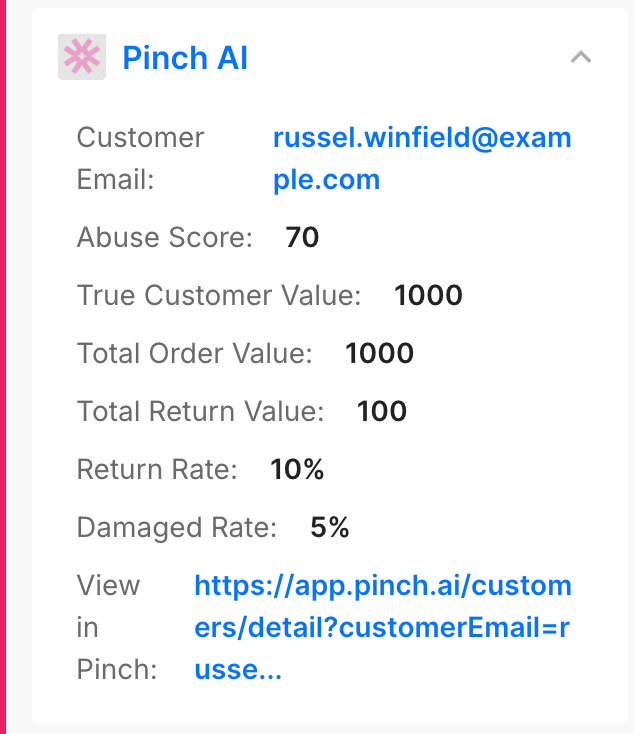
The widget is the only Pinch data visible in Gorgias, as all other information lives in the app itself.
Pinch AI identifies resellers and abusive returners vs trusted shoppers based on their historical purchase and return patterns, and then assigns a decision through configured workflows within the app. When a shopper is considered a potential reseller, they fall under the Block or Review category identified via workflow conditions.
Once the workflow is set up, and an order is placed by a customer, Shopify sends a webhook to the app. The app then internally triggers the workflow, evaluates whether that customer is a reseller based on the workflow conditions, and assigns the appropriate decision.
Below is an example of a Review Decision: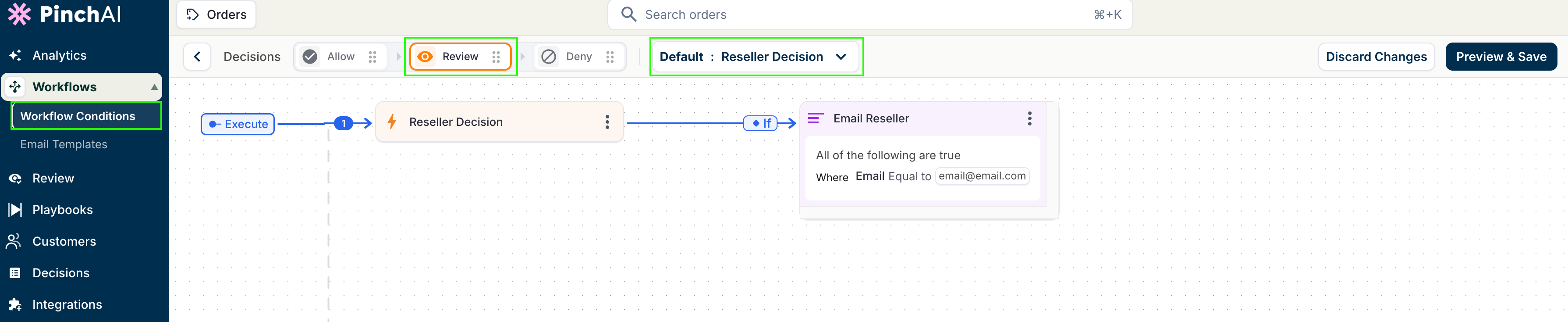
For additional guidance on how to set up different workflows and decisions, please reach out to the Pinch AI team directly.
